


More Useful Technologies!
- Jun 10, 2017
- 2 min read
Last week’s class was short for me, but pretty neat! I had witnessed a brief overview of Google Read & Write for Google Docs before, but I really enjoyed seeing all of the examples of things that can be done by our class this week. I didn’t really know that it could also be used on the web as well as PDF files, so I was excited to learn about the features that can be extended to those platforms. I was doing research for another course in this past week, and I actually used the collect highlights feature to highlight my articles, instead of having to print them off. It was really convenient, because I generally find PDF articles to be hard to manage on the screen. I am really enjoying that I get to keep learning new things that are immediately useful in this course!
As far as using Google Read & Write in my classroom, I am fortunate that licenses were granted to all of my students. I have been trying to work with them where I can over the last few weeks to show them some of the helpful ways they can be using it. I had one using the dictionary feature when she was unsure of words she came across on an online training site, and had another using the word prediction feature while completing a writing task. I am also using it as part of my case study, which you will find out more about during the next class.
I also really enjoyed watching the short videos that everyone found on YouTube for how Assistive Technology has helped with different situations for people who have varying disabilities. Damion and I were responsible for searching for a video on how Assistive Technology has helped someone with ALS, and we found the following heartwarming video about a man who uses a NeuroSwitch in his arm to communicate with his son, and his son has also figured out how to use the technology to communicate with his father.
We also found a video from the creator of NeuroSwitch that explains this amazing technology - the muscles in the arm are what control it! So neat.
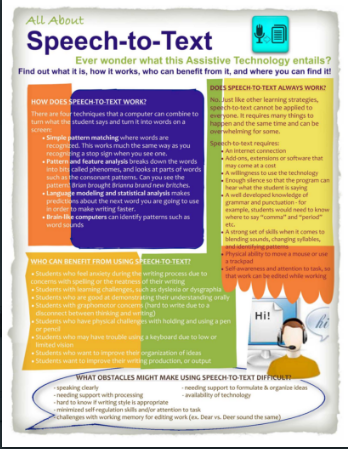
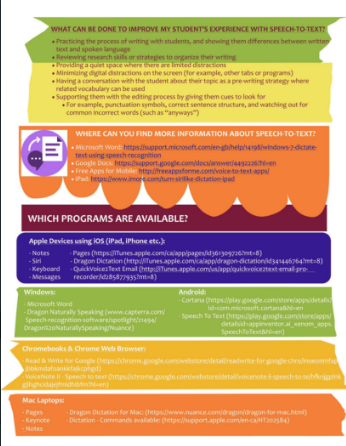
After watching all of the cool videos that everyone had found, we were dismissed to work on Assignment 2. Damion and I did a lot of work to research Speech-to-Text to create our infographic, and I was excited to use Pages on my old Macbook to create our finished project. I find it is so easy to manipulate and to create something that is eye-catching without getting too frustrated by formatting limitations! Our finished product looked like this:


I can’t believe the course is almost over already. I am looking forward to seeing everyone’s case studies next week!
Comments